BATCH 1 / 100 UNITS
Sleepus MK3
Xbox Hardware Macro Device
Custom AT32 hardware macro engine with OLED display and cloud OTA updates. Undetectable. Zero bloatware.
Batch 1 Pre-Orders Opening Soon XBOX & PC
WAITLIST CONFIRMED
You're locked in.
Sleepus MK3 supports Xbox and PC. We'll email you the exact minute Batch 1 drops.
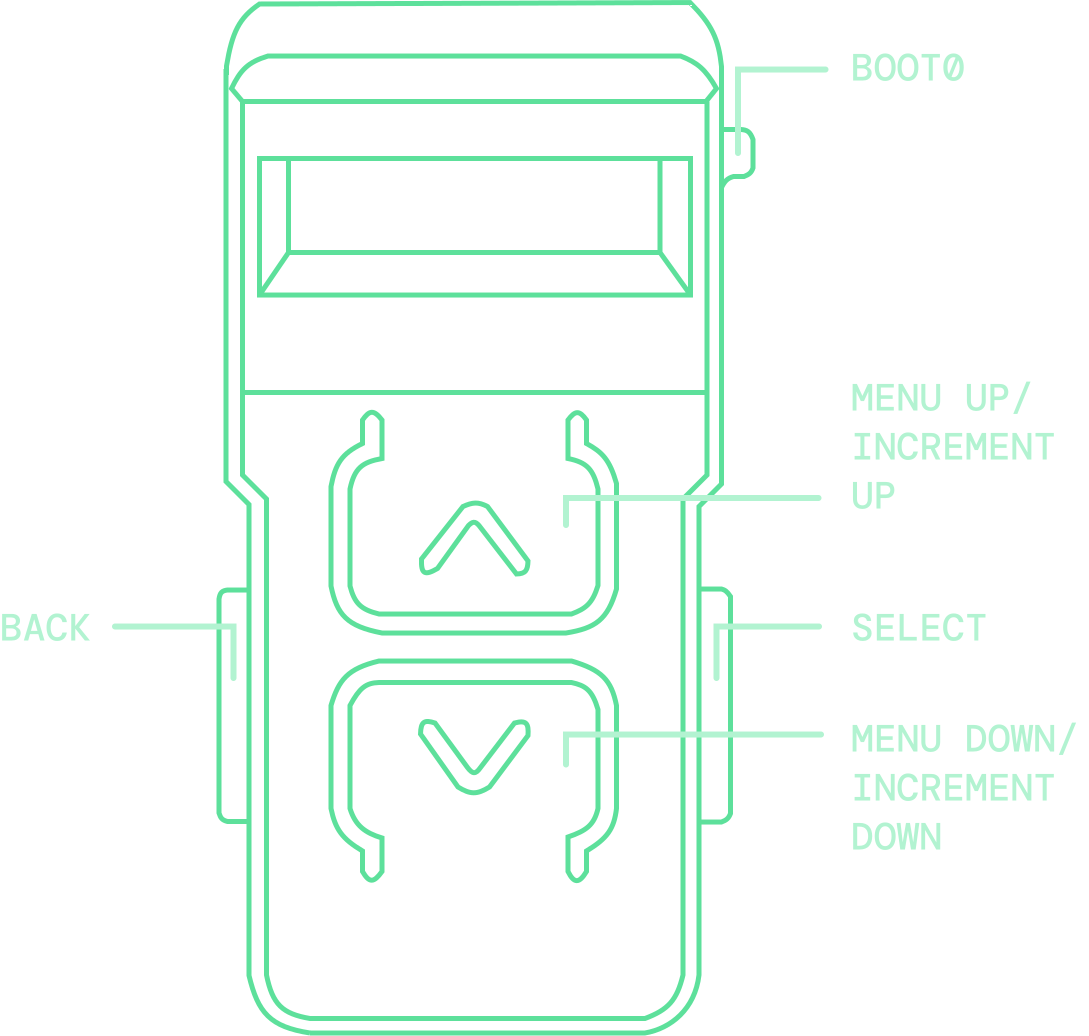
ON-DEVICE CONTROLS
Control layout
Use the four chassis buttons to navigate menus and tune active profiles directly on Sleepus MK3.
GETTING STARTED
Setup guide
Connect Sleepus MK3 between your controller and console before selecting a profile.
-
STEP 01
Remove controller batteries
Remove the batteries from your controller to force wired communication.
-
STEP 02
Connect both USB-C cables
Plug the two supplied USB-C cables into the Sleepus ports.
-
STEP 03
Connect your controller
Plug your controller into the cable from the front USB-A port on Sleepus.
-
STEP 04
Connect your console
Plug the rear USB-C cable into your Xbox console.
-
STEP 05
Play
Enjoy using Sleepus MK3.